Why You Can Hear Them But They Can't Hear You
Frequencies, tones, and the things your radio does without telling you
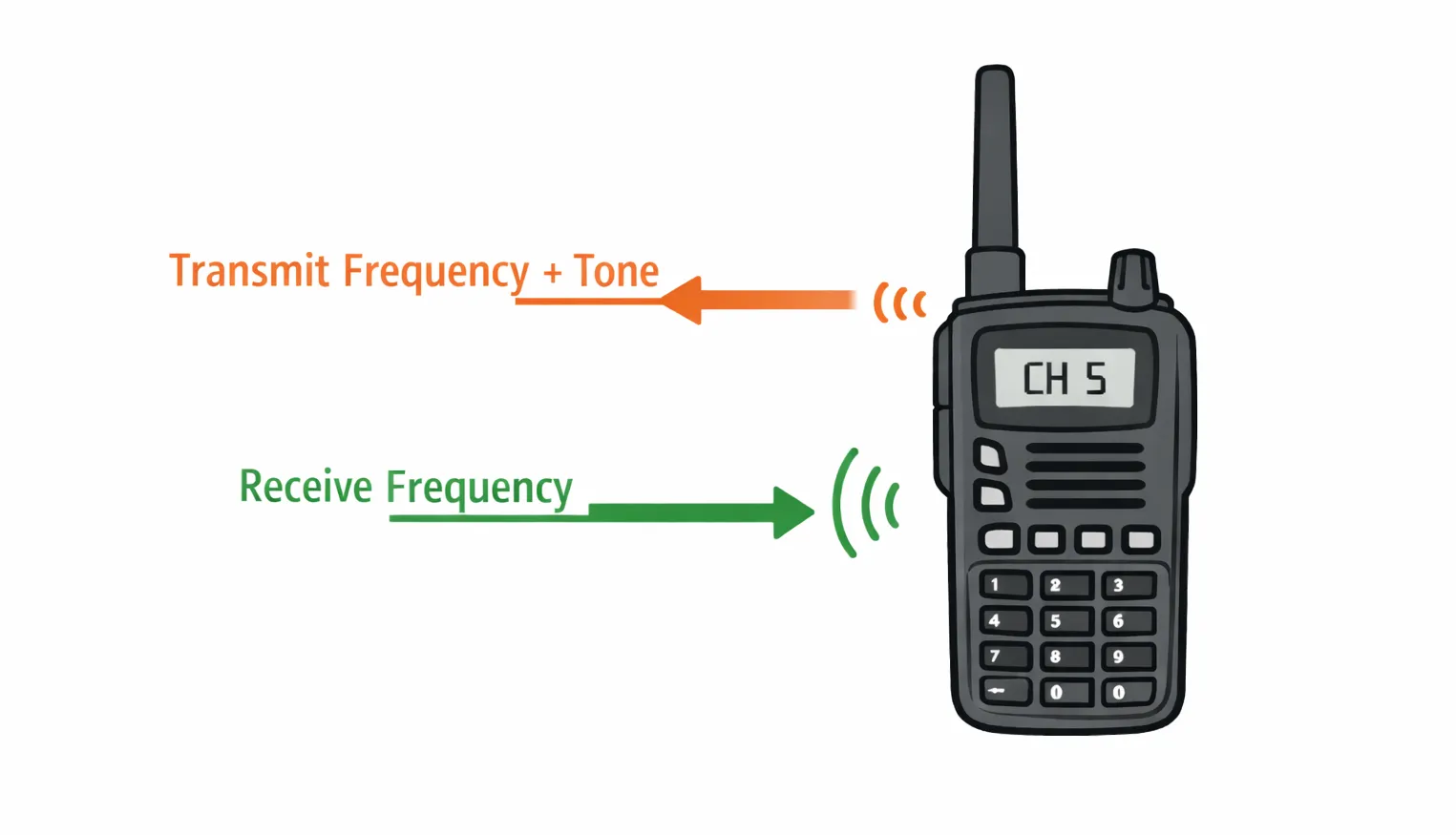
Every time you press the talk button on a repeater channel, your radio is doing three things at once: transmitting on a frequency that's different from the one you were just listening on, embedding an inaudible tone in your signal, and then — when you release the button — switching back to the original frequency to hear the response. All of it happens instantly, silently, and automatically.
Knowing what those three things are, and why they matter, explains most of the confusing behavior people run into on the radio. Including the title of this article.
Repeaters Use Two Frequencies
A repeater sits on a hilltop (or a tower, or a rooftop) with a big antenna. Its job is to receive your signal on one frequency and instantly rebroadcast it on a different frequency, giving it much greater range than any handheld could manage on its own. Your radio knows both frequencies and switches between them automatically every time you press and release the talk button.
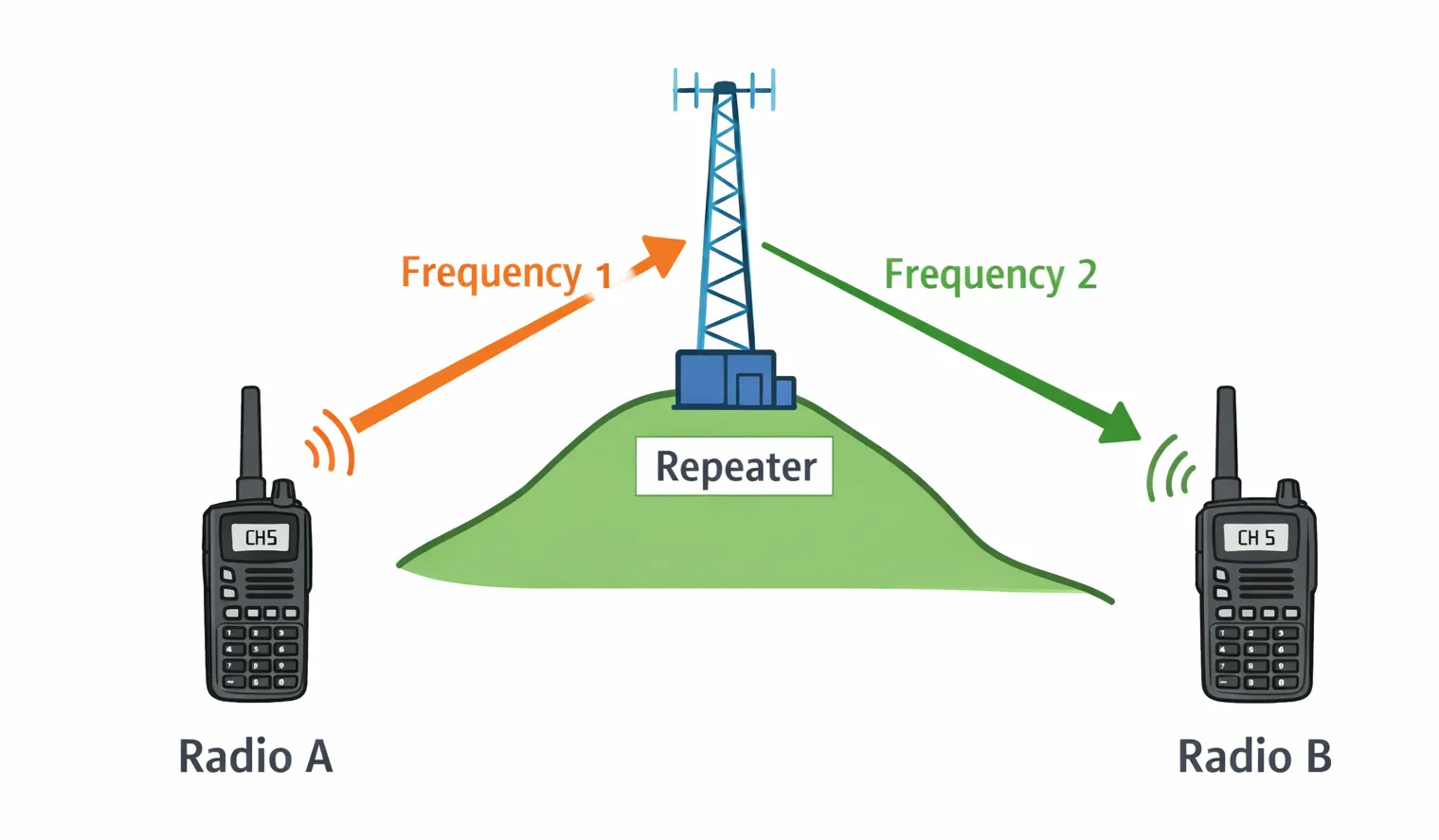
On a simplex channel, by contrast, every radio talks and listens on the same frequency. No repeater involved.
Here's where it gets confusing: the repeater's output frequency is often the same as the simplex frequency for that channel number. So if you're on Channel 15 through the repeater, and someone else is on Channel 15 simplex, strange things happen:
- They hear you fine — because the repeater is outputting on the same frequency they're listening on.
- You might faintly hear them — if they're close enough for their signal to reach you directly. But their transmission doesn't go through the repeater, so it's not boosted and most people on the repeater won't hear it at all.
- They think everything is working — because from their end, they can hear the whole conversation. They have no way to know their own transmissions aren't getting through.
Two people think they're on the same channel, and in a sense they are — but one radio is working through the repeater and the other isn't.
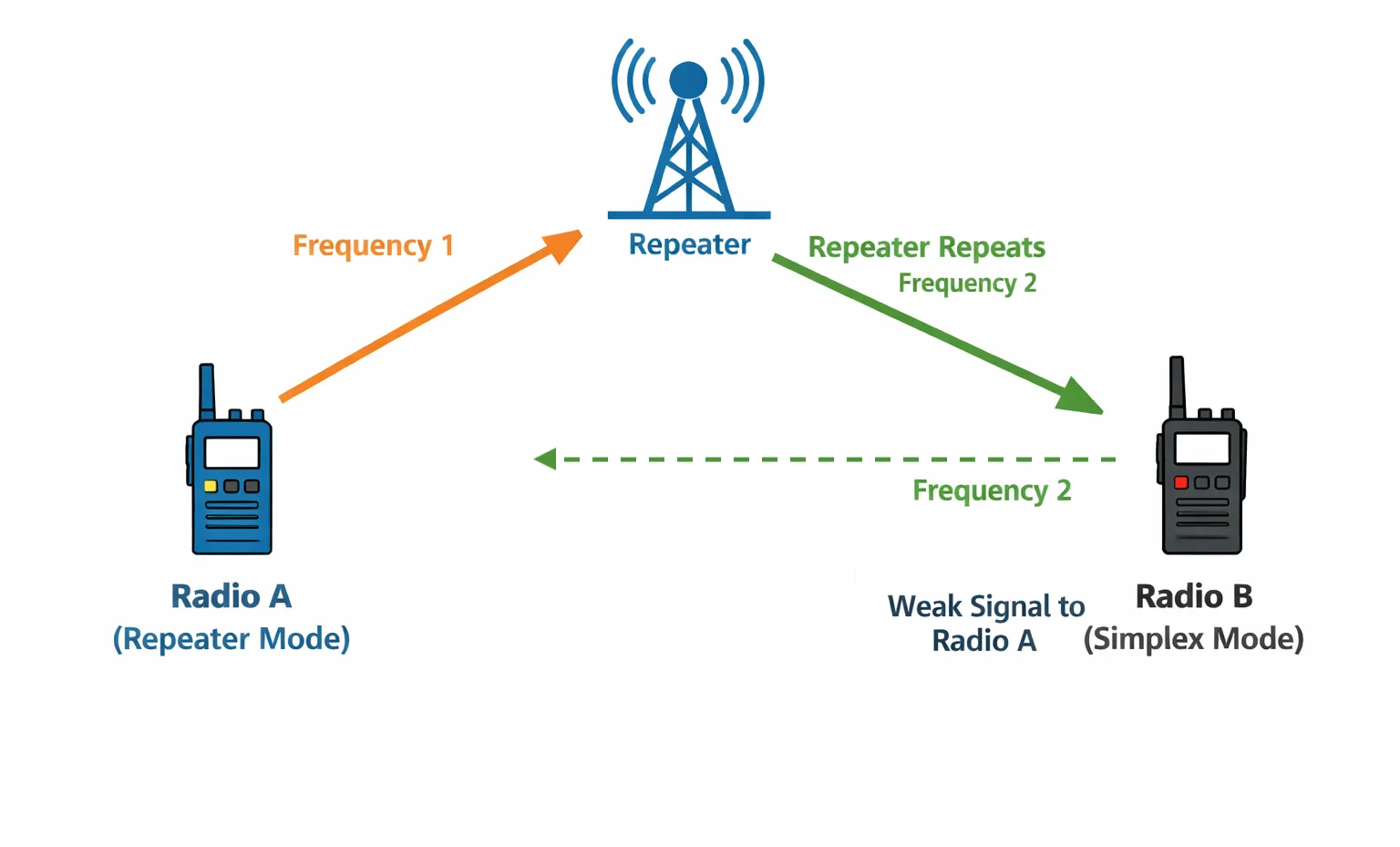
It works the other way too. If someone nearby is talking on simplex — maybe they're out of range of the repeater, or their radio isn't programmed for it — you might hear them clearly on your radio. But because their signal never reaches the repeater, nobody else on the net hears a thing. From your perspective, someone is talking. From everyone else's, the channel is silent.
Once you have a mix of repeater and simplex users on the same channel, communication becomes asymmetric in ways that aren't obvious to anyone involved. Person A hears B but not C. Person B hears everyone. Person C only hears what comes through the repeater. And nobody realizes they're each having a different experience of the same channel.
CTCSS Tones: A Filter the Repeater Uses
There's a third piece beyond the two frequencies: a CTCSS tone. You might also hear this called a "PL tone" or "Private Line" — same thing, different name. "Private Line" is a Motorola trademark that stuck as common usage, though the name is misleading — it doesn't provide any privacy. Anyone tuned to the same frequency can hear your transmission. The tone is a filter, not a lock.
When you transmit, your radio sends a very low-pitched hum along with your voice. It's below the range of normal hearing — you'll never notice it. But the repeater is listening for it.
The repeater is programmed to ignore any transmission that doesn't include the correct tone. No tone, no relay. Wrong tone, no relay. This keeps the repeater from being activated by interference, by other repeaters that happen to share the same frequency, or by radios that aren't part of the system.
This is the second common problem: if your radio isn't sending the right CTCSS tone, the repeater will not respond — even if you're on the correct frequency, even if you're standing right next to it. Your signal arrives, the repeater checks for the tone, doesn't find it, and does nothing.
Tones Work in Both Directions
CTCSS tones have two separate settings on your radio, and they do different things.
Send tone (encode) is the tone your radio transmits along with your voice. This is what the repeater checks. Without the correct send tone, the repeater ignores you. This is the one that matters most.
Receive tone (decode) is a filter on your radio's speaker. When it's set, your radio stays silent unless the incoming signal includes the matching tone. It doesn't affect what you transmit — it only controls what you hear.
These are independent settings. You can have one without the other.
The receive tone is useful because it keeps your radio quiet when there's other traffic on the same frequency that isn't coming through your repeater. Without it, you might hear bits of distant conversations, interference, or signals from other systems. With it set, your speaker only opens when it hears the tone your repeater sends.
This matters on ERSN. The Forest Meadows and Arnold Summit repeaters share the same channel but use different CTCSS tones. If your receive tone isn't set, you'll hear traffic from both repeaters and it may not be obvious which one you're hearing. You could be transmitting through Forest Meadows but listening to a conversation on Arnold Summit — and wondering why nobody responds to you. Setting your receive tone to match the repeater you're using filters out the other one, so you only hear traffic from the repeater you're actually talking through.
This works in reverse too — if you hear traffic and can identify the tone it's carrying, you know which repeater is relaying it. Each repeater covers a specific area, so identifying the repeater tells you roughly where those people are. Some radios can display the detected CTCSS tone. On others, you'd need to compare what you're hearing against a reference list. Either way, it's a handy tool for situational awareness — especially during emergencies when you want to know which part of the area is active.
What Tones Can't Do: The Clobbering Problem
There's an important thing CTCSS tones don't do, and misunderstanding this causes real problems.
CTCSS is a filter. It decides what your radio plays through the speaker. It does not prevent other signals from arriving on the same frequency.
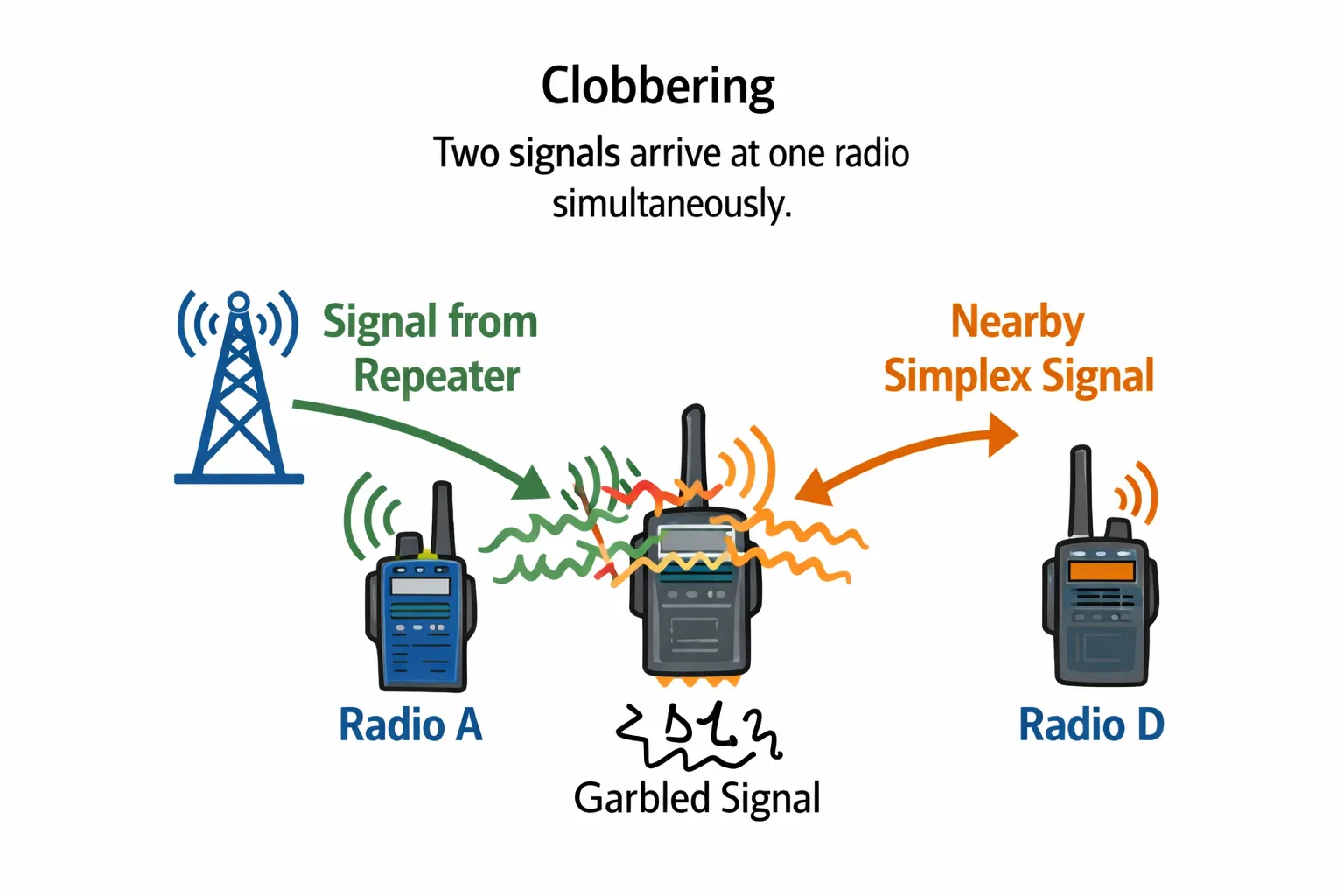
Here's the scenario: your repeater is outputting on a frequency, and someone else transmits simplex on that same frequency. Both signals arrive at your radio's antenna at the same time. The radio receives a garbled mix of both. The tone filtering never gets a chance to help because the signal is already corrupted before the radio can sort it out.
This is called "clobbering," and it's why someone transmitting simplex on a repeater's output frequency causes problems for everyone on that repeater — regardless of anyone's tone settings.
It's also why it matters to know which channels are used by repeaters in your area and to avoid transmitting simplex on them. It's not a courtesy issue. It's a physics issue.
Quick Reference
- Repeater
- A device on a high point that receives your signal on one frequency and rebroadcasts it on another, extending your range.
- Simplex
- Talking and listening on the same frequency, radio-to-radio, no repeater involved.
- CTCSS tone
- A sub-audible hum your radio sends (and/or listens for) to filter out unwanted signals. Sometimes called a "privacy tone," though it provides no actual privacy.
- Send tone (encode)
- The CTCSS tone your radio transmits. Required for the repeater to relay your signal.
- Receive tone (decode)
- A filter on your speaker. Keeps your radio silent unless the incoming signal carries the matching tone.
- Offset
- The difference between the two frequencies a repeater uses. Your radio applies this automatically on repeater channels.
Common "Why Is This Happening?" Scenarios
I can hear everyone, but nobody hears me.
Your radio is probably receiving the repeater's output fine, but your send tone is wrong or missing — so the repeater ignores your transmissions. Have someone check that your encode tone matches the repeater's required tone.
I hear garbled audio or two conversations overlapping.
Someone is likely transmitting simplex on the same frequency your repeater outputs on. That's the clobbering problem. There's nothing you can adjust to fix it — the other transmission needs to move to a different channel.
My radio is silent even though others say the repeater is active.
Your receive tone (decode) may be set to the wrong value, so your radio is filtering out the repeater's signal. Or you may not be programmed to the correct receive frequency.
I can hear people but they sound distant and I can't reach them.
You may be hearing the repeater at the edge of its range. You can receive its boosted signal, but your handheld doesn't have enough power to reach the repeater from where you are. Try moving to higher ground or a location with a clearer line of sight.
I hear conversations that don't seem to involve anyone I know.
You're probably hearing traffic from the other repeater. Forest Meadows and Arnold Summit share a channel but use different tones. If your receive tone isn't set, you'll hear both.
I can talk through one repeater but not the other.
Your send tone may only be set for one. Each repeater requires its own CTCSS tone to respond. If you've moved from one coverage area to the other, you may need to switch to the correct tone for that repeater.
Someone says they can hear me, but I can't hear them.
They may be on simplex nearby. Their signal reaches you directly but doesn't go through the repeater, so it's weak and inconsistent. From their end, they hear you fine through the repeater's output and assume everything is working.
I hear someone but nobody else on the net seems to.
You're probably picking up a simplex transmission from someone close by. Their signal never hits the repeater, so you're the only one near enough to hear it.
I can hit the repeater from home but not from the other side of the ridge.
Repeaters need line of sight. A hill or ridge between you and the repeater can block your signal entirely, even if you're relatively close. Moving to higher ground or a clearing can make the difference.
I hear a brief burst of static every time someone keys up or lets go.
This is normal. It's the squelch opening and closing as the signal starts and stops.
Ready to get on the air? The GMRS Guide covers licensing, radio recommendations, and how to get set up for the ERSN net.